

Earn rewards when you’re steadily investing every month aka cashing in regularly with our Auto Save feature (formerly known as Auto Debit)!
We heard you! You can now maximise the potential of Gold investments by auto saving into Versa Gold and enjoy additional rewards.
Quest Period:
21 March 2025 – 5 January 2026
*Note: The campaign was revised on 5 December 2025.
How to stack returns with Golden Habit Quest:
• Step 1: From the homepage, click on “Quests”.
• Step 2: Open the “Golden Habit Quest”.
• Step 3: Maintain a minimum of RM1,000 in Versa Cash or Cash-i.
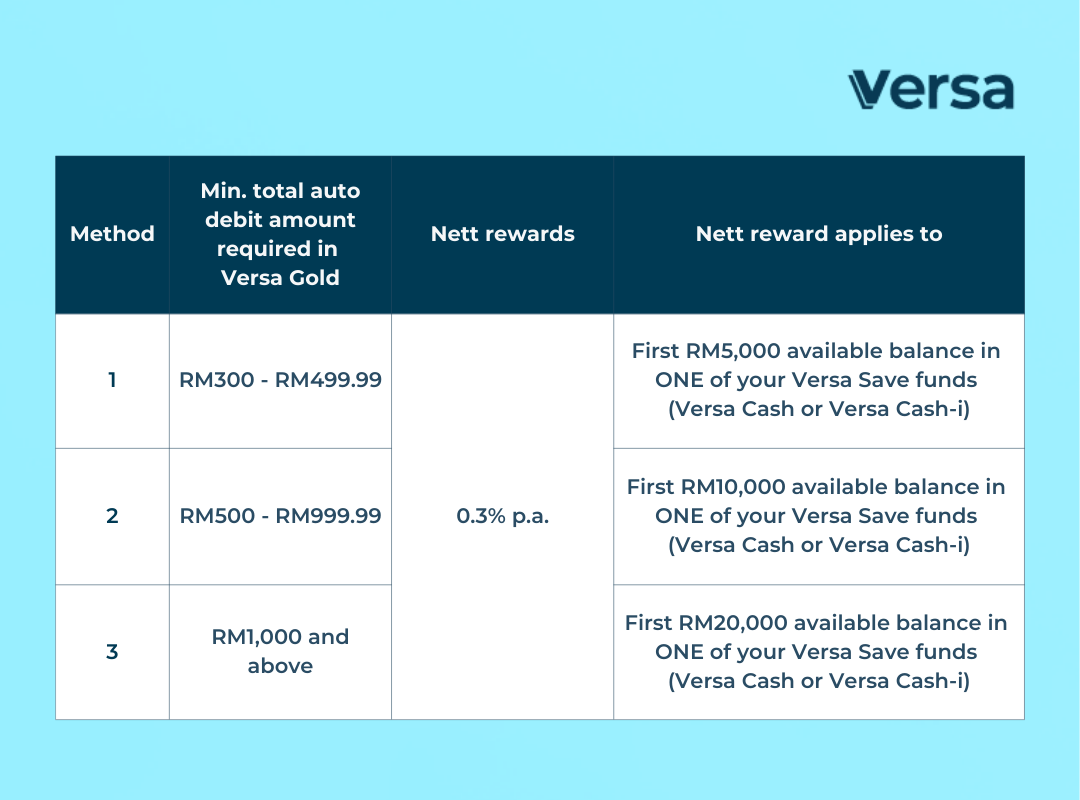
• Step 4: Set up min. RM300 / RM500 / RM1,000 auto save into Versa Gold.
• Step 5: Earn +0.3% p.a. nett booster in Versa Cash or Versa Cash-i!
Below is the only eligible Versa Invest fund you can auto save into to earn +0.3% p.a. nett booster in Versa Cash or Versa Cash-i via our Golden Habit Quest:
✅ Versa Gold
To complete this Quest, choose between auto saving a min. of RM300, RM500, or RM1,000 per month!
Click here to view the T&Cs for Golden Habit Quest
Looking for more Quests? Check out Versa’s Promotion Page!
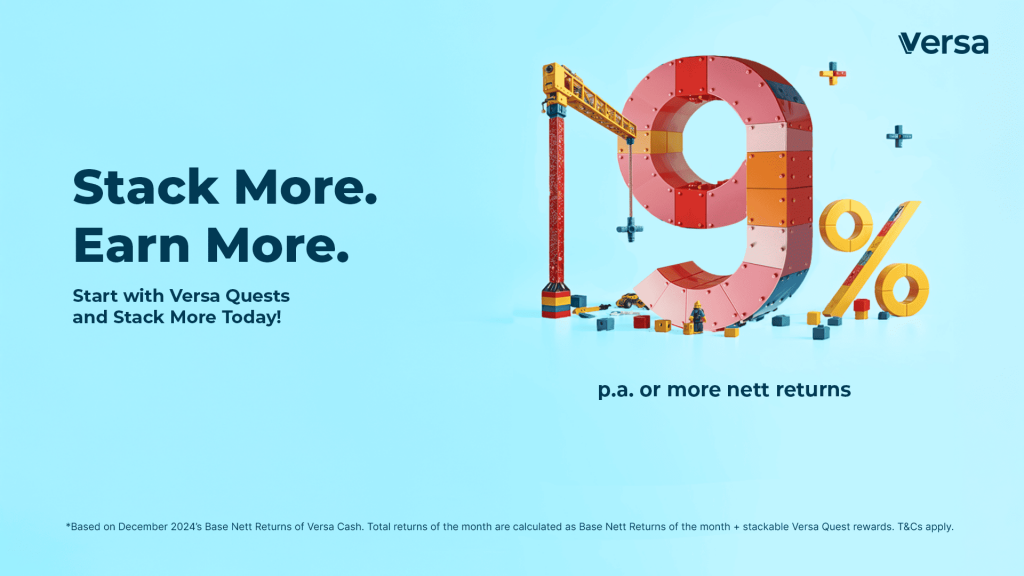
Note: Each Quest is refreshed at the start of each month. To continue earning stacked returns, be sure to complete the Quests every month!
Here’s how you could mix, match and stack with each Quest:
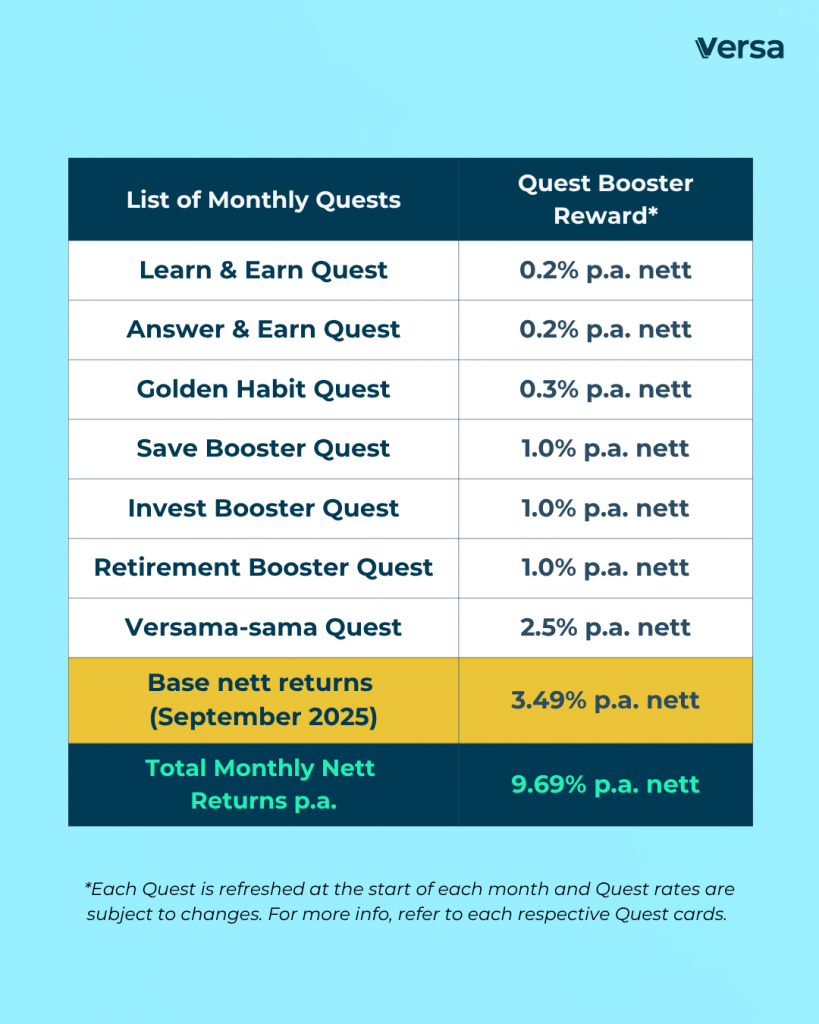
Above is an illustration of how much returns you can earn based on the Quests you complete.
*T&Cs apply.
Frequently Asked Questions
1. [Golden Habit Quest]
Can I manually cash in to Versa Gold every month instead?
No, manual cash-ins to Versa Gold do not make you eligible to enjoy the promotional returns into Versa Cash or Versa Cash-i.
2. [Golden Habit Quest]
Can I set up an Auto Save Plan for Versa Cash or Versa Cash-i instead?
No, the promotional +0.3% p.a. nett booster into Versa Cash or Versa Cash-i is only applicable when you set up an auto save plan of:
• min. RM300, RM500, or RM1,000 into Versa Gold.
If you would like to set up an auto save plan into Versa Save, you may join our Save Booster Quest where you set up an auto save plan of:
• min. RM300 into any Versa Save funds to earn +0.3% p.a. nett in Versa Save
• min. RM600 into any Versa Save funds to earn +0.6% p.a. nett in Versa Save
3. [Golden Habit Quest]
Can I set up more than 1 Auto Save Plan into Versa Gold?
Yes, you can set up more than 1 auto save into Versa Gold, by setting up multiple auto save bank accounts.
If you’re using the same auto save bank account, you won’t be able to set up more than 1 auto save plan into Versa Gold.
4. [Golden Habit Quest]
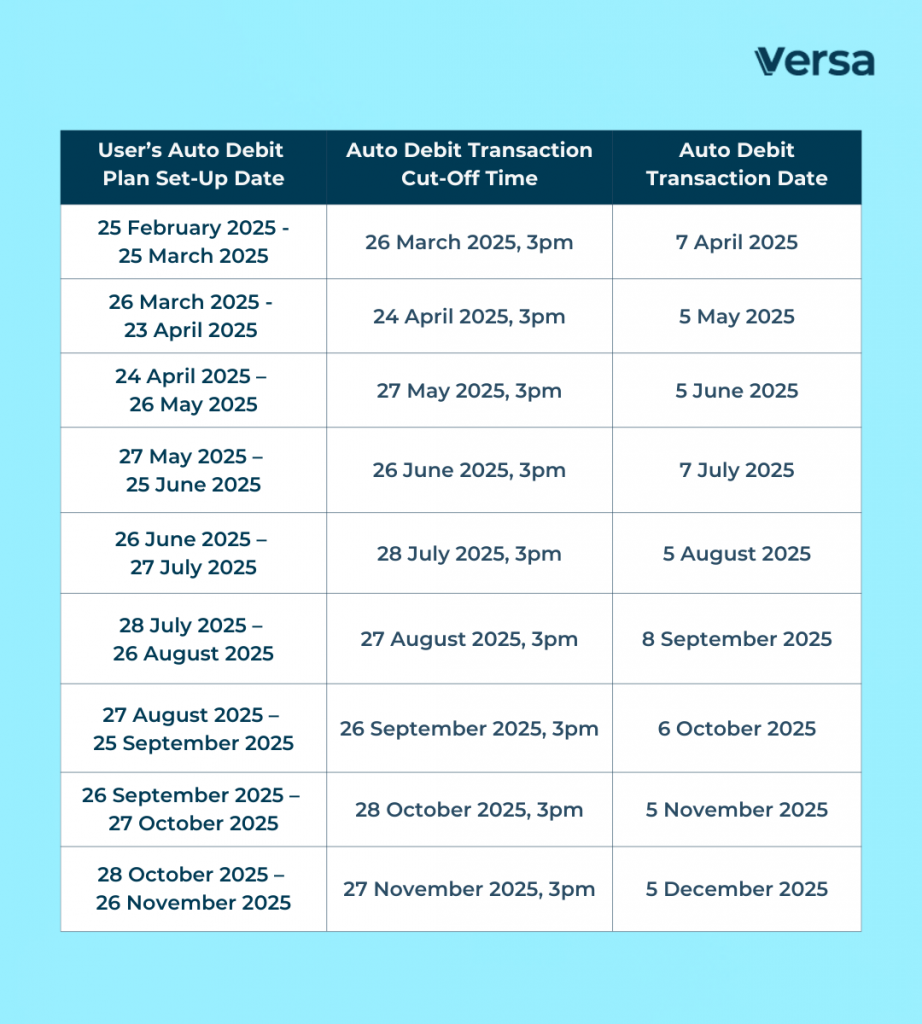
Is there a cut-off time for setting up my Auto Save Plan?
Yes, check out our table below on the cut-off dates. We encourage you to set it up by the cut-off time of every month to ensure your eligibility for our promotional +0.3% p.a. nett booster.
5. [Golden Habit Quest]
When will my Auto Save Plan be deducted from my bank account?
Your auto save amount will be deducted from your bank account on the 5th of every month. For non-Maybank users, the deduction may take place on the next working day if the 5th is a public holiday or weekend. Your funds will be deposited into your chosen Versa fund within 2-3 business days.
6. [Golden Habit Quest]
What happens when my bank account balance is less than the amount set in my Auto Save plan?
All Auto Save transactions will automatically fail, and hence for that month, you will not be eligible for the +0.3% p.a. nett booster rate. Therefore, we encourage you to ensure that your bank account balance is higher than the total amount of your auto save plan.
7. [Golden Habit Quest]
What happens if the name on my Versa account doesn’t match the name on my bank account?
All Auto Save transactions will automatically fail, and hence for that month, you will not be eligible for the +0.3% p.a. nett booster rate. Therefore, we encourage you to ensure that you use a bank account registered to your name to sign up for Versa’s auto save.
8. When will I earn my Versa Quests rewards?
As long as you complete your Versa Quests within the stated expiry dates, your rewards will be credited to your Versa account in the following month.
9. Are Versa Quests’ rewards before or after fees?
All stackable return rates shown in the app are not subjected to Management Fees or Trustee Fees. However, the base nett return rates displayed are after fees, meaning the nett returns you receive each month is after the deduction of these fees.
10. Will my rewards be credited into my Versa Cash or Versa Cash-i account?
Your rewards will be credited into the fund with the higher available balance on the last day of the eligible month during the Campaign Period. For example, if you have a higher balance in Versa Cash than Versa Cash-i, then you will receive your reward in Versa Cash.
If both your Versa Cash and Versa Cash-i have the same available balance, Versa Cash-i will be the default rewarded fund.
Start stacking your returns today!
Should you have any questions, please do not hesitate to reach out to us here. 💬